Audi A6 Typ 4G: Balance Weight, Removing And Installing
 Caution
This procedure contains mandatory replaceable parts.
Refer to component overview and parts catalog prior to
starting procedure.
Mandatory Replacement Parts
- Bolts - Vibration damper to brake caliper.
Depending on the model there are two balance weights
installed in each front brake caliper.
Removing
- Remove the dust cap if equipped.
- Remove the bolt -1-.
- Remove the vibration damper -2-
from the brake caliper -3-.
Installing
- Clean the brake caliper around the balance weight.
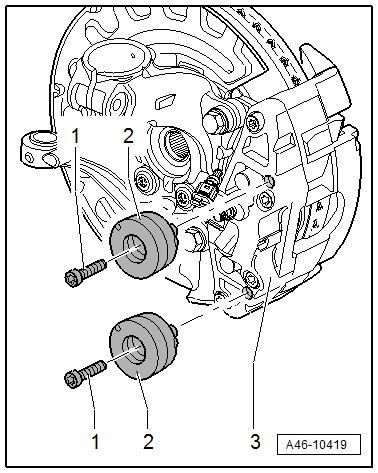
- Install the damper -2- in the
brake caliper.
- Install the new bolts -1- and tighten -item 1-.
- Replace the existing protective cap.
READ NEXT:
Brake Pads, Removing and Installing, Steel Brakes, 1LA/1LJ
Special tools and workshop equipment
required
Torque Wrench 1331 5-50Nm -VAG1331-
Piston Resetting Tool -T10145-
Lithium grease. Refer t
Brake Caliper, Removing and Installing, Steel Brakes, 1LA/1LJ
Special tools and workshop equipment
required
Torque Wrench 1332 40-200Nm -VAG1332-
Caution
This procedure contains mandatory
Brake Caliper, Replacing, Steel Brakes, 1LA/1LJ/1LF/1LL/1LU and Ceramic
Brakes, LN/1LW
Special tools and workshop equipment
required
Torque Wrench 1332 40-200Nm -VAG1332-
Brake Pedal Actuator -VA
SEE MORE:
Description
Applies to: vehicles with garage door opener (HomeLink)
Fig. 35 Garage door opener: examples of usage for different
systems
With the garage door opener (HomeLink), you
can activate systems such as the garage doors,
security systems or house lights from inside your
vehicle. Three buttons
General Information, Brake Fluid
Brake fluid is hygroscopic, meaning that it has the ability
to absorb water and moisture from the air.
If water has been absorbed, the boiling point will drop, for
example, during high braking temperatures the brake fluid may
develop steam bubbles and cause the br


