Audi A6 Typ 4G: D-Pillar Trim Panel, Removing and Installing
D-Pillar Trim, Removing and Installing, Sedan
Special tools and workshop equipment required
- Wedge Set -T10383-
- Omega Clip Tool -T40280-
Removing
 WARNING
Follow all Safety Precautions when working with pyrotechnic components. Refer to → Chapter "Pyrotechnic Components Safety Precautions".
- Versions with foldable rear seat backrest: for the rear seat backrest forward.
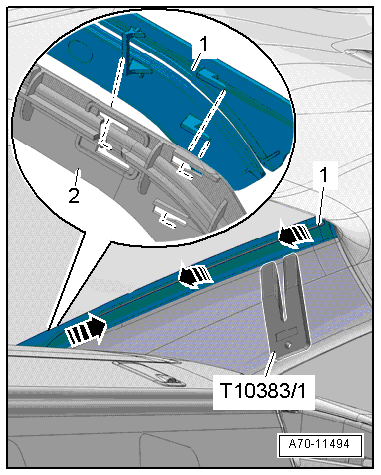
- Vehicles with sun shade: starting at the top, use the Wedge Set -T10383/1- to unclip the trim panel -1- for the sun shade guide strip -arrows-.
- Pull the lower part of the trim upward and out of the sun shade guide strip -2-; then remove it from the inside.
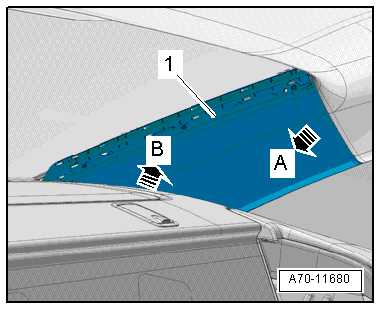
- Unclip the D-pillar trim -1- using the Wedge Set -T10383/1- trim removal wedge -arrow A-.
- Pull the D-pillar trim upward from the rear shelf -arrow B- and remove.
Installing
WARNING
- Follow all Safety Precautions when working with pyrotechnic components. Refer to → Chapter "Pyrotechnic Components Safety Precautions".
- Do not pinch the head curtain airbag when installing the D-pillar trim.
Install in reverse order of removal. Note the following:
Installation notes, for example tightening specifications, replacing components. Refer to → Chapter "Overview - D-Pillar Trim, Sedan".
D-Pillar Trim Panel, Removing and Installing, Avant
Special tools and workshop equipment required
- Pry Lever -80-200-
- Omega Clip Tool -T40280-
- Trim Removal Wedge -3409-
Removing
- Remove the luggage compartment side trim. Refer to → Chapter "Luggage Compartment Side Trim Panel, Removing and Installing, Avant".
- Remove the rear roof panel trim. Refer to → Chapter "Roof End Strip, Removing and Installing".
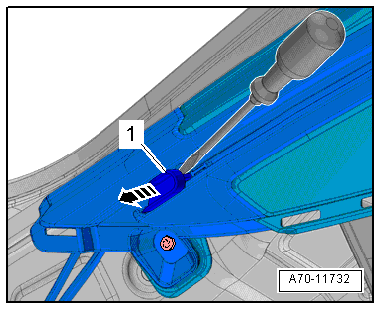
- Unclip the yoke -1- for the luggage compartment cover with the Trim Removal Wedge -3409- or with the screwdriver -arrow-.
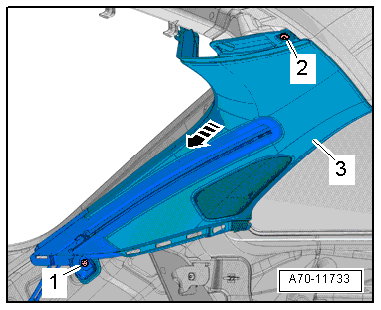
- Remove the bolts -1 and 2-.
- Unclip the D-pillar trim panel -3- from the body -arrows- using the Pry Lever -80-200-.
- Unclip and remove the D-pillar luggage compartment cover guide from the luggage compartment cover guide rails.
Installing
Install in reverse order of removal. Note the following:
- Attach and install the D-pillar luggage compartment cover guide to the luggage compartment cover guide rails.
Installation notes, for example tightening specifications, replacing components. Refer to → Chapter "Overview - C-Pillar Trim Panel, Avant".