Audi A6 Owners & Service Manuals
Audi A6 Typ 4G (2011–2018) Workshop Manual / Body / Body Exterior / Rear Doors / Overview - Window Regulator

Audi A6 Typ 4G: Overview - Window Regulator

Overview - Window Regulator

Overview - Window Regulator

1 - Rear Door

2 - Window Regulator

  Note

Vehicles with tinted glass have a different version.

  • Removing and installing. Refer to → Chapter "Window Regulator, Removing and Installing".

3 - Door Window

  Note

Vehicles with tinted glass have a different version.

  • Removing and installing. Refer to → Chapter "Front Door Window, Removing and Installing".

4 - Threaded Pins

5 - Cap

6 - Nut

  • 6 Nm

7 - Left Rear Window Regulator Motor -V26-

  • Removing and installing. Refer to → Chapter "Window Regulator Motor, Removing and Installing".

8 - Bolt

  • 3.5 Nm
  • Quantity: 3

9 - Nut

  • 6 Nm

Overview - Window Regulator and Window Regulator Motor
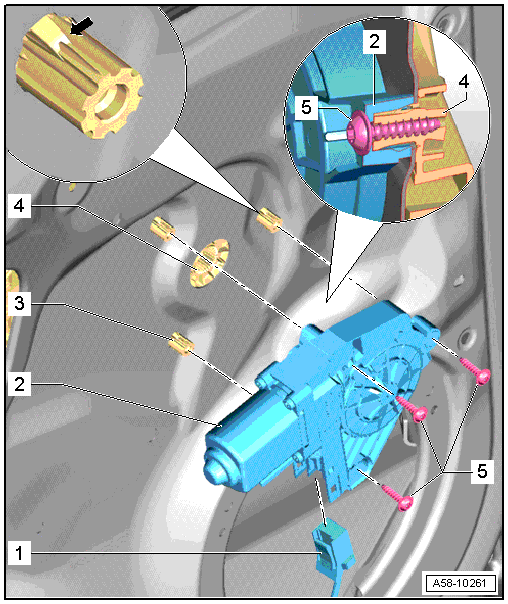
Overview - Window Regulator and Window Regulator Motor

1 - Connector

  • Disconnect the connector from the window regulator motor.

2 - Left Rear Window Regulator Motor -V26-

  • Removing and installing. Refer to → Chapter "Window Regulator Motor, Removing and Installing".

3 - Threaded Pin

4 - Window Regulator

5 - Bolt

  • Tightening specification, -item 8-.

    READ NEXT:

     Overview - Door Handle and Door Lock

    Overview - Door Handle and Door Lock 1 - Exterior Door Handle Versions: with trim molding, removing and installing. Refer to → Chapter "Door Handle Trim Molding, Removing and Inst

     Window Regulator Motor, Removing and Installing

    1 - Connector - Disconnect the connector from the window regulator motor. 2 - Left Rear Window Regulator Motor -V26-   Note The window regulator motor can be removed o

     Door Handle, Removing and Installing

    Housing, Removing and Installing Removing - Press the door outer seal to the side and remove the protective film over the hole -arrow A-. - Remove the locking bolt -4- as far as the stop u

    SEE MORE:

     Driver Assistance Systems Front Camera

    Driver Assistance Systems Front Camera, Calibrating Special tools and workshop equipment required Setting Device Basic Set -VAS6430/1- Vehicle Diagnostic Tester Wheel Alignment Computer   Note Make sure the Camera Control Module -J852- fits correctly in the bracket. Perform a visual

     In curves

    Applies to: vehicles with Audi adaptive cruise control Fig. 91 Example: driving into a curve When driving into a curve fig. 91 and out of a curve, the adaptive cruise control may react to an object in the neighboring lane and apply the brakes. You can prevent that by pressing the accelerator pedal

    © 2011-2026 Copyright www.aa6.tochrfr.com