Audi A6 Typ 4G: Catch, Removing and Installing
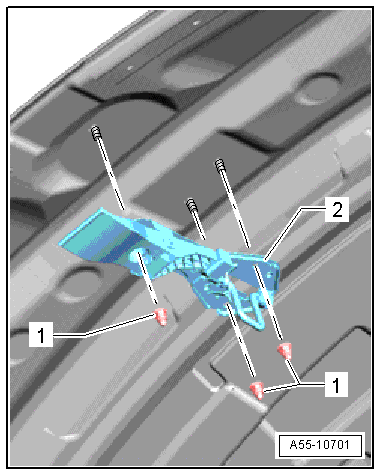
Hood Hook, Removing and Installing
Removing
- Remove the nuts -1- and the
hood catch -2-.
Installing
Install in reverse order of removal.
Lock Carrier Hook, Removing and Installing
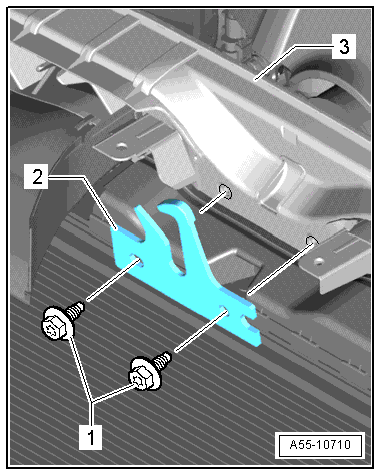
Removing
- Remove the lock carrier cover.
- Remove the bolts -1- and then
remove the hood catch -2- from the
lock carrier -3-.
- Tighten the bolts to 5 Nm.
Installing
Install in reverse order of removal.
Catch, Removing and Installing
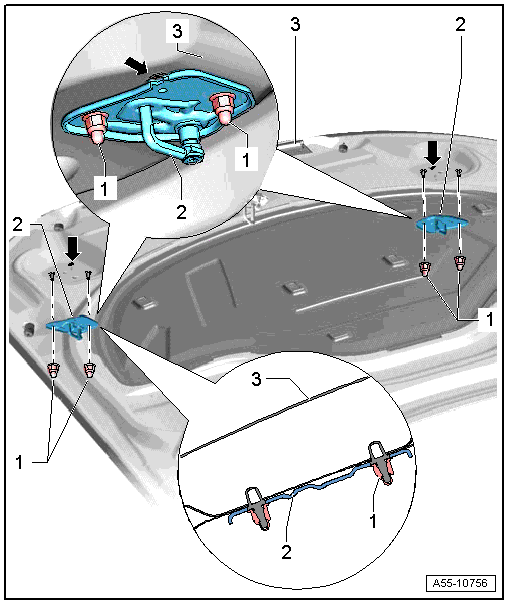
1 - Nut
- Tightening specification. Refer to
→ Chapter "Overview - Hood".
2 - Catch
- Removing
- Remove the bolts and the hood catch.
- Installing
- Align the hood catch with the markings on the hood
-arrows- and then tighten the bolts.
3 - Hood
READ NEXT:
1 - Hood
2 - Hood Hinge
Removing
Before removing a hood hinge, support the hood or secure it against
falling.
Remove the gas-filled strut. Refer to
→ Chapter "Gas-
Overview - Rear Lid, Sedan
1 - Rear Lid
Removing and installing. Refer to
→ Chapter "Rear Lid, Removing and Installing, Sedan".
2 - Stop Strip
3 - Adjusting
Rear Lid, Removing and Installing, Sedan
1 - Rear Lid
A second technician will be needed during removal and installation
to support and to hold the rear lid.
Removing:
Note
Ma
SEE MORE:
Component Location Overview - Airbag Crash Sensors
Note
The crash sensors in the Sedan are illustrated.
1 - Driver Front Airbag Crash Sensor -G283-
Installation location: on the headlamp housing bracket
Removing and installing. Refer to
→ Chapter "Front Airbag Crash S
Overview - Locking Mechanism, Sedan
Note
The overview shows the locking mechanism on the left 1/3 section of
the rear seat backrest. The locking mechanism on the right 2/3 section
of the rear seat backrest is identical.
1 - Rear Seat Backrest Frame
2 - Key
3 -&nb


