Audi A6 Typ 4G: Hood, Removing and Installing
Hood Impact Guard, Replacing
 Note
Note
The impact guard is also equipped with double-sided adhesive tape.
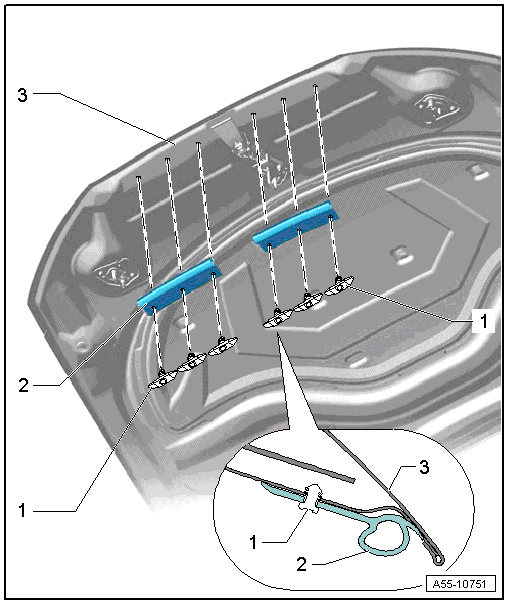
1 - Clip
2 - Impact Guard
- To remove, remove the clip from the hood and then remove the impact
guard.
3 - Door
Hood Seal, Removing and Installing
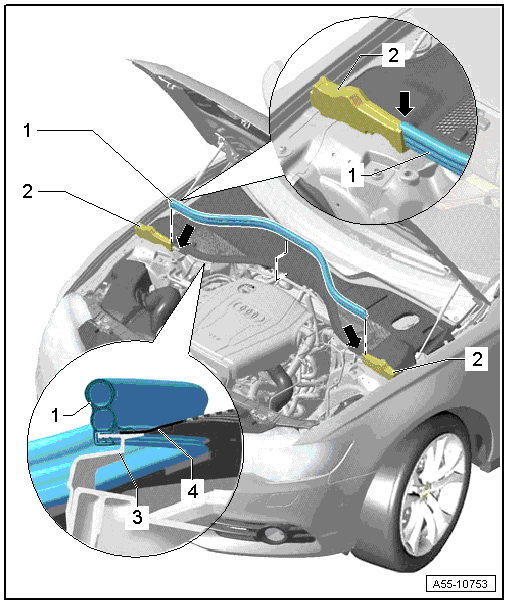
1 - Gasket for Plenum Chamber
- To remove, pull forward off the body flange.
- Mount the seal on the foam piece and then push it onto the flange on
the body.
- Mount the seal on the opposite side on the foam piece and push it
onto the flange on the body.
- Press the seal on the opposite side on the flange on the body using
up any overlap.
2 - Right Sealing Profile
- To remove, unclip it from the fender flange and the suspension strut
tower.
- Press the clips on the foam piece into the body when installing.
3 - Plenum Chamber Bulkhead
- Slide the plenum chamber seal on at the sides.
READ NEXT:
Special tools and workshop equipment
required
Gauge - Gap Adjustment -3371-
Gap Dimensions for Hood
Note
All dimensions are in mm with a +- 0.5 mm tolerance.
Dimension -A- = 4.5 mm
Di
Removing
- Disconnect the connector -4-
from the anti-theft alarm system.
- Disconnect the connector from the lock carrier.
- Free up the release cable -1-
by removing the clamps.
-&n
Hood Hook, Removing and Installing
Removing
- Remove the nuts -1- and the
hood catch -2-.
Installing
Install in reverse order of removal.
Lock Carrier Hook, Removing and Installing
Removing
-&n
SEE MORE:
Overview - Head Curtain Airbag
Overview - Head Curtain Airbag
Note
In the image, the head curtain airbag in the Sedan is illustrated.
1 - Connector
Driver side: for Driver Head Curtain Airbag Igniter -N251-
Front passenger side: for the Front Passenger Head Curtain Airbag
Ign
Park the vehicle as far as possible from moving
traffic in the event of a breakdown. In the event
of a flat tire, park the vehicle on a level surface.
It you are on a steep hill, be especially careful.
Set the parking brake.
Switch the emergency flashers on.
Set up the warning triangle.
Hav


